How to Choose a Mobile Stand for an Interactive Screen
A mobile stand allows one interactive screen to serve multiple classrooms or training rooms. Done correctly, it is a cost-effective strategy. Done incorrectly — with an underpowered stand and a heavy screen — it is a safety risk.
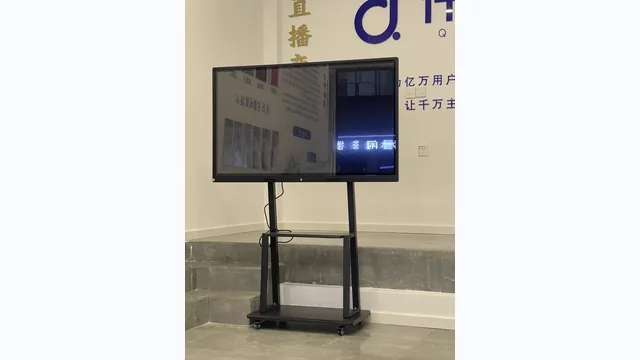
Load rating must exceed screen weight
The first thing to confirm is that the stand's rated load capacity exceeds the screen's net weight with a reasonable safety margin (at least 20%):
| Screen size | Net weight | Minimum stand rating |
|---|---|---|
| 55 inch (HL-55T) | 27 kg | ≥ 35 kg |
| 65 inch (HL-65T) | 40 kg | ≥ 50 kg |
| 75 inch (HL-75T) | 56 kg | ≥ 70 kg |
| 86 inch (HL-86T) | 72 kg | ≥ 90 kg |
For 98 inch and above, mobile stands are generally not recommended. The combined weight (screen + stand) exceeds 130 kg, making safe movement difficult and floor load a concern.
Wheel quality
The heavy-duty stand included in EKINTRY's accessory range uses 75mm castors with individual locking mechanisms on each wheel. This is important: a stand that locks only 2 of 4 wheels is unstable during use. All 4 wheels should lock independently before the teacher begins writing on the screen.
VESA compatibility
Confirm the stand's VESA hole pattern matches the back of the screen before ordering separately. EKINTRY screens use standard VESA patterns; our bundled stands are pre-verified compatible.
Corridor and doorway width
The packed width of the 86 inch screen box is 2068 mm. Measure every doorway and corridor the stand will pass through before ordering. Standard interior doors (800–900 mm) will not accommodate an 86 inch screen on a stand without prior planning.
Height adjustment
The EKINTRY heavy-duty stand adjusts in height to suit different user groups. For schools with mixed primary and secondary use, adjustable height lets the screen sit at appropriate eye level for both age groups.